Windows Phone Developers

Friday, April 23, 2010

How to pass Database Field Name to SQLDataReader GetString Function

How to retrieve data from SQLDataReader using FieldNames in C# (.NET)

It is always better practice to use Field names instead of Index. You can decide which of the following is clear


string sPlayerName =  rdr[1].ToString();
             sPlayerName = rdr["PlayerFirstName"].ToString();


The best overloaded method match for 'System.Data.Common.DbDataReader.GetString(int)' has some invalid arguments
Digg Technorati Delicious StumbleUpon Reddit BlinkList Furl Mixx Facebook Google Bookmark Yahoo
ma.gnolia squidoo newsvine live netscape tailrank mister-wong blogmarks slashdot spurl StumbleUpon

Parametrized Query in C# / .NET

How to pass parameters in SQL Queries in .NET (C#)

Parametrized queries are more secure (avoids SQL Injection etc) and easy to handle. The following example shows an simple example.


The above table has details of Players like name, contact details etc.

Let us try to get the details of players whose first name is 'Sachin'. First make a connection to database :

string sConString = GetConnectionString("TeamDBConnectionString");
            SqlConnection Con = new SqlConnection(sConString);
            SqlCommand Cmd = new SqlCommand();
            Cmd.Connection = Con;

            Con.Open();


Then set the CommandText property of SQLCommand and pass the parameters

String sSQLCmdText = "Select * from PlayerDetails where PlayerFirstName  = @FirstName";
            Cmd.CommandText = sSQLCmdText;
            Cmd.Parameters.AddWithValue("@FirstName", "Sachin");

Once this done, declare a SQLDataReader and get the rows into it


SqlDataReader rdr = Cmd.ExecuteReader();

            while (rdr.Read() == true)
            {
              string sPlayerName =  rdr.GetString(1);
            }
            
            Con.Close();


You can also pass the FieldName as parameter to query Digg Technorati Delicious StumbleUpon Reddit BlinkList Furl Mixx Facebook Google Bookmark Yahoo
ma.gnolia squidoo newsvine live netscape tailrank mister-wong blogmarks slashdot spurl StumbleUpon

SQLDataReader - Invalid attempt to read when no data is present

The error occurs when there no data is returned / the data has not been read.

The first case can be checked using HasRows flag

If the data is not read it can be done as follows:


SqlDataReader rdr = Cmd.ExecuteReader();

            while (rdr.Read() == true)
            {
              string sName =  rdr.GetString(1);
            }


Digg Technorati Delicious StumbleUpon Reddit BlinkList Furl Mixx Facebook Google Bookmark Yahoo
ma.gnolia squidoo newsvine live netscape tailrank mister-wong blogmarks slashdot spurl StumbleUpon

Wednesday, April 21, 2010

How to Add Generic List Items to ListBox in C# / VB.NET

We have already seen How to Add an ArrayList to ListBox. The following code shows how to add a C# Generic List to ListBox


        public void Load_LB_GenericList()
        {
            List Team = new List();
            ClassTeam CT = new ClassTeam(ClassTeam.playerType.Contract, "Sachin", 23, "33420242");
            Team.Add(CT);
            CT = new ClassTeam(ClassTeam.playerType.Contract, "Sourav", 23, "33420242");
            Team.Add(CT);
            CT = new ClassTeam(ClassTeam.playerType.Contract, "Dravid", 23, "33420242");

            Team.Add(CT);
            listBox1.DataSource = Team;
            listBox1.DisplayMember = "Name";
            listBox1.ValueMember = "Phone";

        }
Digg Technorati Delicious StumbleUpon Reddit BlinkList Furl Mixx Facebook Google Bookmark Yahoo
ma.gnolia squidoo newsvine live netscape tailrank mister-wong blogmarks slashdot spurl StumbleUpon

How to assign an ArrayList to ListBox in .NET (C#)

How to add ArrayList items to ListBox (VB.NET/C#) / How to Add Objects to ListBox using C# (.NET)

Let us consider an userform with a listbox. We now need to assign the Arraylist to the Listbox.

We go back to our Teamexample. We have a class called ClassTeam with following properties


     class ClassTeam
    {
        #region declarations
        public enum playerType { ClassA, ClassB, ClassC, Contract }
        private playerType _PlayerType;
        string _Name;
        int _Age;
        string _Phone;


        #endregion

        #region properties
        public playerType PlayerType
        {
            //accessor
            get { return _PlayerType; }

            //mutator
            set
            {
                _PlayerType = value;
            }

        }

        public string Name
        {
            get { return _Name; }

            set
            {
                _Name = value;
            }
        }

        public string Phone
        {
            get { return _Phone; }

            set
            {
                _Phone = value;
            }
        }

        public int Age
        {
            get { return _Age; }

            set
            {
                _Age = value;
            }
        }
        #endregion

        #region public methods
        public string SetPlayer()
        {

            return null;
        }
        #endregion

        #region ClassTeam Construct
        public ClassTeam(playerType PT, string sName, int iAge, string sPhone )
        {
            PlayerType = PT;
            _Name= sName;
            _Age = iAge;
            _Phone = sPhone;
        }

    #endregion

    }


Now we create objects of the above class and add it to an Arraylist


            ArrayList Team = new ArrayList();
            ClassTeam CT = new ClassTeam(ClassTeam.playerType.Contract, "Sachin", 23, "33420242");
            Team.Add(CT);
            CT = new ClassTeam(ClassTeam.playerType.Contract, "Sourav", 23, "33420242");
            Team.Add(CT);
            CT = new ClassTeam(ClassTeam.playerType.Contract, "Dravid", 23, "33420242");

            Team.Add(CT);
 

The arraylist 'Team' will nowcontain three ClassTeam objects.

Assign the ArrayList as datasource to the listbox and set the displaymember and valuemember


            listBox1.DataSource = Team;
            listBox1.DisplayMember = "Name";
            listBox1.ValueMember = "Phone";


Some methods of ListBox will not be available when use DataSource. Digg Technorati Delicious StumbleUpon Reddit BlinkList Furl Mixx Facebook Google Bookmark Yahoo
ma.gnolia squidoo newsvine live netscape tailrank mister-wong blogmarks slashdot spurl StumbleUpon

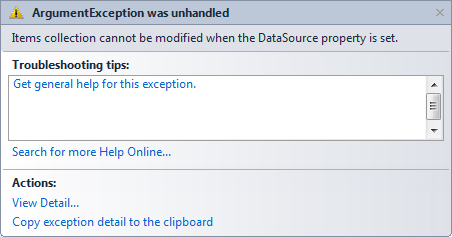
Items collection cannot be modified when the DataSource property is set.

Sorted property of ListBox Throws error


The error occurs when you are trying to do something that is not allowed. For example, Sorting is not allowed in Listbox when it is linked to DataSource. If you need to sort, then sort the DataSet before linking it to Listbox Digg Technorati Delicious StumbleUpon Reddit BlinkList Furl Mixx Facebook Google Bookmark Yahoo
ma.gnolia squidoo newsvine live netscape tailrank mister-wong blogmarks slashdot spurl StumbleUpon

Monday, April 19, 2010

How to iterate MultiSelect ListBox using C# (.NET)

C# - Get Selected Values from MultiSelect ListBox

Here is a way of retrieving the selected values of Multiselect listbox

for (int i1 = 0; i1 < listBox1.SelectedItems.Count; i1++)
            {
                DataRowView D1 = listBox1.SelectedItems[i1] as DataRowView;

                MessageBox.Show(D1[1].ToString());
            }
The above code uses SelectedItems collection to retrieve information Digg Technorati Delicious StumbleUpon Reddit BlinkList Furl Mixx Facebook Google Bookmark Yahoo
ma.gnolia squidoo newsvine live netscape tailrank mister-wong blogmarks slashdot spurl StumbleUpon