Windows Phone Developers

Wednesday, March 31, 2010

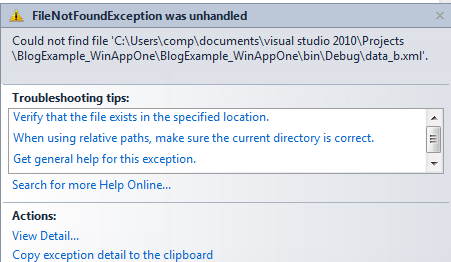
System.IO.FileNotFoundException was unhandled

The error occurs when an attempt is made to open a file that is not available

The following statement

stream = File.Open("data.xml", FileMode.Open);

will throw an error if data.xml is not available
Digg Technorati Delicious StumbleUpon Reddit BlinkList Furl Mixx Facebook Google Bookmark Yahoo
ma.gnolia squidoo newsvine live netscape tailrank mister-wong blogmarks slashdot spurl StumbleUpon

Program '..Sample.exe' has more than one entry point defined: '..Program.Main()'. Compile with /main to specify the type that contains the entry poin

Program '..Sample.exe' has more than one entry point defined: '..Program.Main()'. Compile with /main to specify the type that contains the entry point.

This error occurs when there are two Sub Main() functions in a solution Digg Technorati Delicious StumbleUpon Reddit BlinkList Furl Mixx Facebook Google Bookmark Yahoo
ma.gnolia squidoo newsvine live netscape tailrank mister-wong blogmarks slashdot spurl StumbleUpon

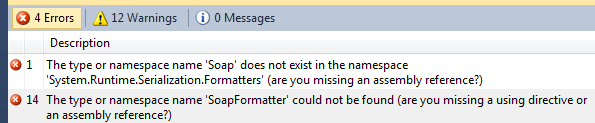
The type or namespace name 'SoapFormatter' could not be found (are you missing a using directive or an assembly reference?)

The type or namespace name 'Soap' does not exist in the namespace 'System.Runtime.Serialization.Formatters' (are you missing an assembly reference?)


The type or namespace name 'SoapFormatter' could not be found (are you missing a using directive or an assembly reference?)

Add the following reference to the project to solve the error

Digg Technorati Delicious StumbleUpon Reddit BlinkList Furl Mixx Facebook Google Bookmark Yahoo
ma.gnolia squidoo newsvine live netscape tailrank mister-wong blogmarks slashdot spurl StumbleUpon

Tuesday, March 30, 2010

Accessors and mutators in C#

Accessors and mutators do the job of retrieving and storing the data to a class member. The class member will be usually private and hence cannot be accessed directly by the object.

The following code provides a hint of the same


public enum playerType { ClassA, ClassB, ClassC, Contract }
private playerType _PlayerType;
string Name;
string Age;
string Phone;


#endregion

#region properties
public playerType PlayerType
{
//accessor
get { return _PlayerType; }

//mutator
set
{
_PlayerType = value;
}

}


Here _PlayerType is declared as private. This can be however accessed in the main program as shown below:


ClassTeam CT = new ClassTeam();
CT.PlayerType = ClassTeam.playerType.Contract; //Calls the Mutator
MessageBox.Show(CT.PlayerType.ToString()); // Calls the Accessor


The statement CT.PlayerType = ClassTeam.playerType.Contract; Calls the Mutator (set property) and sets the value and CT.PlayerType.ToString() uses Get property and retrieves the value Digg Technorati Delicious StumbleUpon Reddit BlinkList Furl Mixx Facebook Google Bookmark Yahoo
ma.gnolia squidoo newsvine live netscape tailrank mister-wong blogmarks slashdot spurl StumbleUpon

System.StackOverflowException was unhandled - Set Property C#

Set Property C# goes to infinite loop

If the set property goes to infinite loop, then there is some problem with accessor and mutator.

The following example is a good (rather bad) for recursive looping of the properties


public playerType PlayerType
{
get { return PlayerType; }

set
{
PlayerType = value;
}

}


In order to correct it, declare a private variable and get/set that variable.


private playerType _PlayerType;

public playerType PlayerType
{
get { return _PlayerType; }

set
{
_PlayerType = value;
}

}

Digg Technorati Delicious StumbleUpon Reddit BlinkList Furl Mixx Facebook Google Bookmark Yahoo
ma.gnolia squidoo newsvine live netscape tailrank mister-wong blogmarks slashdot spurl StumbleUpon

Monday, March 29, 2010

Your step-into request resulted in an automatic step-over of a property or operator.

Your step-into request resulted in an automatic step-over of a property or operator.

This behavior can be overridden in the context menu for the line being executed by choosing 'Step Into Specific' or by unchecking the option 'Step over properties and operators'.

Do you want to continue being notified when an automatic step-over happens?

Digg Technorati Delicious StumbleUpon Reddit BlinkList Furl Mixx Facebook Google Bookmark Yahoo
ma.gnolia squidoo newsvine live netscape tailrank mister-wong blogmarks slashdot spurl StumbleUpon

Sunday, March 28, 2010

How to effectively use #region in Visual Studio

#region lets you specify a block of code that you can expand or collapse when using the outlining feature of the Visual Studio Code Editor.

The collapse and expand feature can be used for advantage with good declaration of regions

For example:


namespace BlogExample_WinAppOne
{
class ClassTeam
{
#region declarations
public enum playerType { ClassA, ClassB, ClassC, Contract }
#endregion

#region properties
public playerType PlayerType
{
get { return PlayerType; }

set
{
PlayerType = value;
}

}


#endregion

#region public methods
public string SetPlayer
{

}
#endregion
}
}


Would look like the following when collapsed:


Please share your thoughts on effective usage of #region Digg Technorati Delicious StumbleUpon Reddit BlinkList Furl Mixx Facebook Google Bookmark Yahoo
ma.gnolia squidoo newsvine live netscape tailrank mister-wong blogmarks slashdot spurl StumbleUpon